> ## Documentation Index
> Fetch the complete documentation index at: https://docs.tenderly.co/llms.txt
> Use this file to discover all available pages before exploring further.
# Bridges
> Relay LayerZero, Chainlink CCIP, Across, and CCTP messages between networks in a Multichain Virtual Environment, with configurable relay modes.
The Bridge Module connects the networks in a [Multichain Virtual Environment](/virtual-environments/multichain/overview). With it enabled, a source-chain transaction that emits a bridge event triggers the corresponding delivery on the destination chain within the same Virtual Environment. Relay runs in the mode you configure (immediate or delayed) and uses no real funds.
The Bridge Module is available on plans that include multichain capabilities. [Contact us](https://tenderly.co/contact-us) to enable it on your account.
## Enabling the Bridge Module
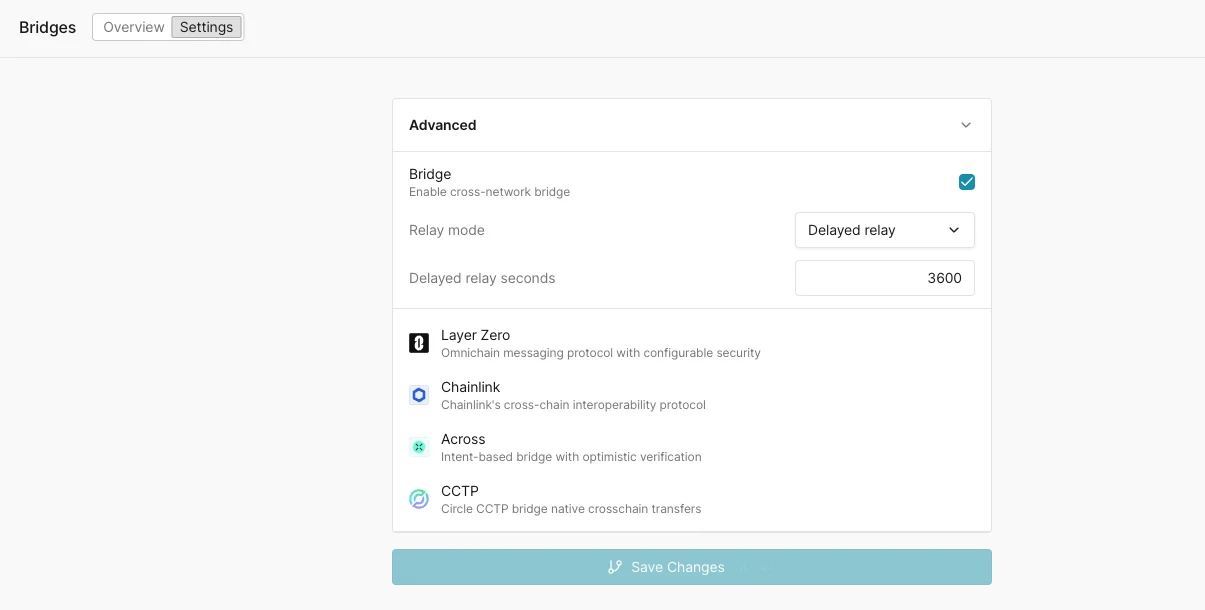
Open the **Settings** page for your Virtual Environment and expand the **Advanced** panel. Check **Bridge** ("Enable cross-network bridge"), then **Save Changes**. Once enabled, relay covers every supported protocol on the networks attached to the Virtual Environment.
Two settings control how messages are relayed:
* **Relay mode**: `Auto relay` delivers the destination transaction as soon as the source event is detected. `Delayed relay` holds delivery for a fixed interval so you can test in-flight timing and destination-chain latency.
* **Delayed relay seconds**: the delay applied in `Delayed relay` mode (for example `3600`).
 The module only relays where the protocol contracts are already deployed. If a protocol is not present on a network in your Virtual Environment, that route is not available. The [Bridge contracts panel](#bridge-dashboard) shows which protocol router contracts are deployed per network.
## Supported protocols
| Protocol | Version support | What it relays |
| - | - | - |
| **LayerZero** | Standard messaging (see note below) | Omnichain messaging protocol with configurable security. A source `PacketSent` triggers the destination delivery (`lzReceive`). |
| **Chainlink CCIP** | v1.5, v1.6, and v2.0 | Chainlink's cross-chain interoperability protocol. A source `CCIPMessageSent` triggers the destination delivery: `manuallyExecute` on v1.5 and v1.6 OffRamps, `execute` on v2.0 OffRamps. |
| **Across** | V3 | Intent-based bridge with optimistic verification. A source `V3FundsDeposited` triggers the destination fill. |
| **CCTP** | v2.0 | Circle's Cross-Chain Transfer Protocol for native USDC transfers across chains. |
LayerZero relay covers standard omnichain messages. LayerZero Read requests are relayed on Ethereum Mainnet only, and composed messages (`lzCompose`) are not relayed.
Chainlink CCIP relay follows the lane version automatically: the module detects the send event of each ramp version and delivers through the matching OffRamp, so lanes that migrate from v1.6 to v2.0 keep relaying without configuration changes. On v2.0 lanes the module handles the Cross-Chain Verifier (CCV) step inside the Virtual Environment, so no off-chain committee signatures are needed. Token transfers that require an off-chain attestation (such as USDC through CCTP-backed token pools) are not relayed on any CCIP version.
## Supported networks
Bridge protocol availability is narrower than overall network support because the Bridge Module relies on the real protocol contracts being present on a given network. Initial coverage:
| Protocol | Initially supported networks |
| - | - |
| LayerZero | Ethereum, Arbitrum, Optimism, Base, Polygon |
| Chainlink CCIP | Ethereum, Arbitrum, Optimism, Base, Polygon |
| Across | Ethereum, Arbitrum, Optimism, Base, Polygon |
| CCTP | Ethereum, Arbitrum, Optimism, Base, Polygon |
Per-network protocol support follows the protocol's own deployments. For Chainlink CCIP, check the [CCIP Directory](https://docs.chain.link/ccip/directory/mainnet) to confirm which networks CCIP supports.
Coverage expands based on customer demand. If you need a specific network enabled for a bridge protocol, reach out to us at [support@tenderly.co](mailto:support@tenderly.co).
## Bridge dashboard
The **Overview** tab gives you operational visibility into all bridge activity in the Virtual Environment:
* **Top routes**: each source-to-destination network pair, its protocol, and the number of relayed operations.
* **Bridge contracts**: the protocol router contracts deployed on each network, with network, contract name, address, and protocol.
* **Bridge transactions**: a list of every relayed operation with its status, source network and transaction, destination network and transaction, protocol, and relative time. An auto-refresh interval control keeps the list current.
The module only relays where the protocol contracts are already deployed. If a protocol is not present on a network in your Virtual Environment, that route is not available. The [Bridge contracts panel](#bridge-dashboard) shows which protocol router contracts are deployed per network.
## Supported protocols
| Protocol | Version support | What it relays |
| - | - | - |
| **LayerZero** | Standard messaging (see note below) | Omnichain messaging protocol with configurable security. A source `PacketSent` triggers the destination delivery (`lzReceive`). |
| **Chainlink CCIP** | v1.5, v1.6, and v2.0 | Chainlink's cross-chain interoperability protocol. A source `CCIPMessageSent` triggers the destination delivery: `manuallyExecute` on v1.5 and v1.6 OffRamps, `execute` on v2.0 OffRamps. |
| **Across** | V3 | Intent-based bridge with optimistic verification. A source `V3FundsDeposited` triggers the destination fill. |
| **CCTP** | v2.0 | Circle's Cross-Chain Transfer Protocol for native USDC transfers across chains. |
LayerZero relay covers standard omnichain messages. LayerZero Read requests are relayed on Ethereum Mainnet only, and composed messages (`lzCompose`) are not relayed.
Chainlink CCIP relay follows the lane version automatically: the module detects the send event of each ramp version and delivers through the matching OffRamp, so lanes that migrate from v1.6 to v2.0 keep relaying without configuration changes. On v2.0 lanes the module handles the Cross-Chain Verifier (CCV) step inside the Virtual Environment, so no off-chain committee signatures are needed. Token transfers that require an off-chain attestation (such as USDC through CCTP-backed token pools) are not relayed on any CCIP version.
## Supported networks
Bridge protocol availability is narrower than overall network support because the Bridge Module relies on the real protocol contracts being present on a given network. Initial coverage:
| Protocol | Initially supported networks |
| - | - |
| LayerZero | Ethereum, Arbitrum, Optimism, Base, Polygon |
| Chainlink CCIP | Ethereum, Arbitrum, Optimism, Base, Polygon |
| Across | Ethereum, Arbitrum, Optimism, Base, Polygon |
| CCTP | Ethereum, Arbitrum, Optimism, Base, Polygon |
Per-network protocol support follows the protocol's own deployments. For Chainlink CCIP, check the [CCIP Directory](https://docs.chain.link/ccip/directory/mainnet) to confirm which networks CCIP supports.
Coverage expands based on customer demand. If you need a specific network enabled for a bridge protocol, reach out to us at [support@tenderly.co](mailto:support@tenderly.co).
## Bridge dashboard
The **Overview** tab gives you operational visibility into all bridge activity in the Virtual Environment:
* **Top routes**: each source-to-destination network pair, its protocol, and the number of relayed operations.
* **Bridge contracts**: the protocol router contracts deployed on each network, with network, contract name, address, and protocol.
* **Bridge transactions**: a list of every relayed operation with its status, source network and transaction, destination network and transaction, protocol, and relative time. An auto-refresh interval control keeps the list current.
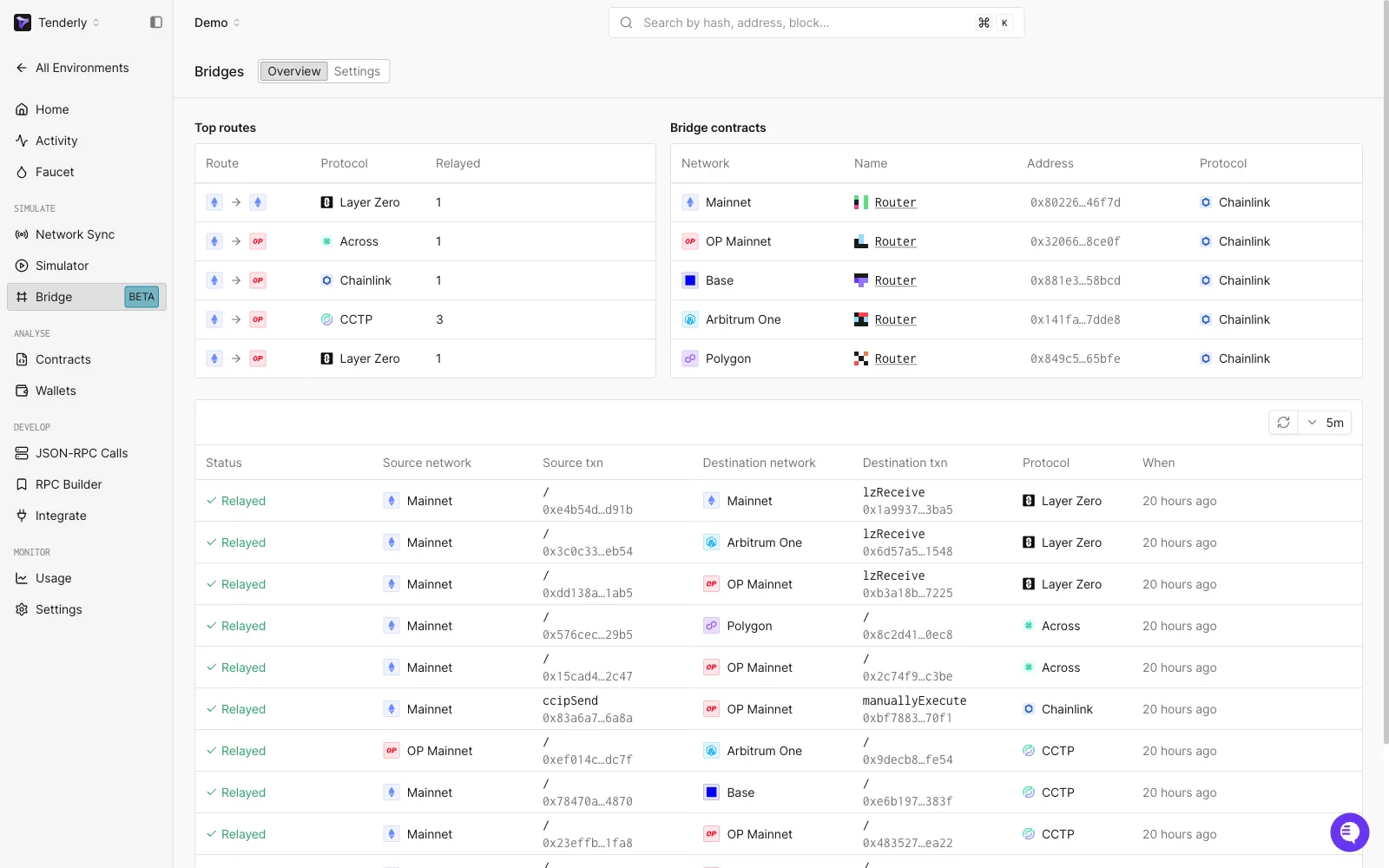 To confirm a round-trip, find the source transaction (for example a LayerZero `PacketSent`) and follow its row across to the matching destination transaction (`lzReceive`).
### Bridge operation detail
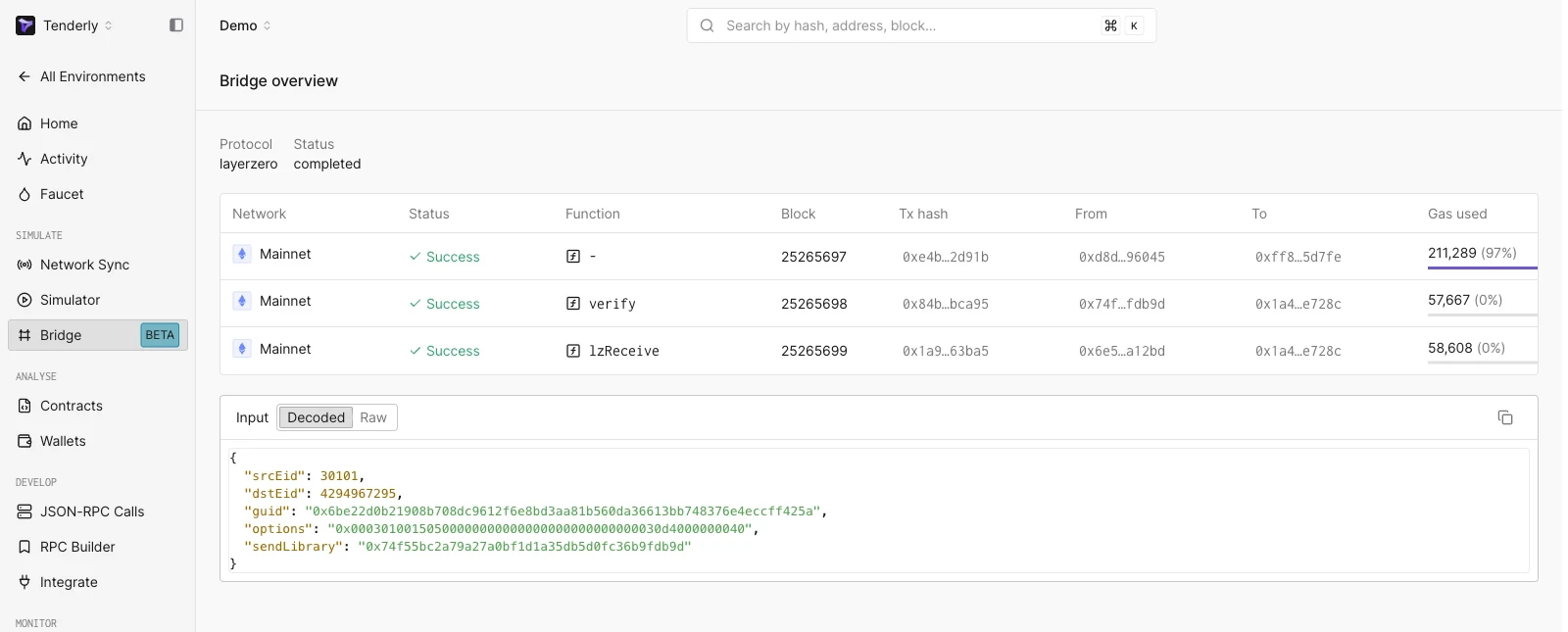
Selecting a row opens the bridge operation, which shows the protocol, the overall status, and the chain of transactions that make up the cross-chain message: each step's network, status, function (for example `verify`, `lzReceive`), block, transaction hash, sender, recipient, and gas used. An **Input** viewer renders the decoded message payload (`srcEid`, `dstEid`, `guid`, `options`, `sendLibrary`) with a Decoded/Raw toggle.
To confirm a round-trip, find the source transaction (for example a LayerZero `PacketSent`) and follow its row across to the matching destination transaction (`lzReceive`).
### Bridge operation detail
Selecting a row opens the bridge operation, which shows the protocol, the overall status, and the chain of transactions that make up the cross-chain message: each step's network, status, function (for example `verify`, `lzReceive`), block, transaction hash, sender, recipient, and gas used. An **Input** viewer renders the decoded message payload (`srcEid`, `dstEid`, `guid`, `options`, `sendLibrary`) with a Decoded/Raw toggle.
 ## When to use bridging
| Scenario | Use |
| - | - |
| Cross-chain dApps, bridges, governance, and multi-chain protocol logic | [Multichain Virtual Environment](/virtual-environments/multichain/overview) with bridging on |
| Single-network development with no bridge concerns | A standard [Virtual Environment](/virtual-environments/quickstart) per network |
## See also
* [Multichain Virtual Environments overview](/virtual-environments/multichain/overview)
* [Multichain quickstart](/virtual-environments/multichain/quickstart)
* [Unlimited Faucet](/virtual-environments/unlimited-faucet)
* [Admin RPC](/virtual-environments/admin-rpc)
This documentation is built and hosted on [Mintlify](https://mintlify.com), a developer documentation platform.
## When to use bridging
| Scenario | Use |
| - | - |
| Cross-chain dApps, bridges, governance, and multi-chain protocol logic | [Multichain Virtual Environment](/virtual-environments/multichain/overview) with bridging on |
| Single-network development with no bridge concerns | A standard [Virtual Environment](/virtual-environments/quickstart) per network |
## See also
* [Multichain Virtual Environments overview](/virtual-environments/multichain/overview)
* [Multichain quickstart](/virtual-environments/multichain/quickstart)
* [Unlimited Faucet](/virtual-environments/unlimited-faucet)
* [Admin RPC](/virtual-environments/admin-rpc)
This documentation is built and hosted on [Mintlify](https://mintlify.com), a developer documentation platform.