> ## Documentation Index
> Fetch the complete documentation index at: https://docs.tenderly.co/llms.txt
> Use this file to discover all available pages before exploring further.
# Project Settings
> Change the project name, manage project access and members, create project access tokens, transfer a project, or delete it from Project Settings.
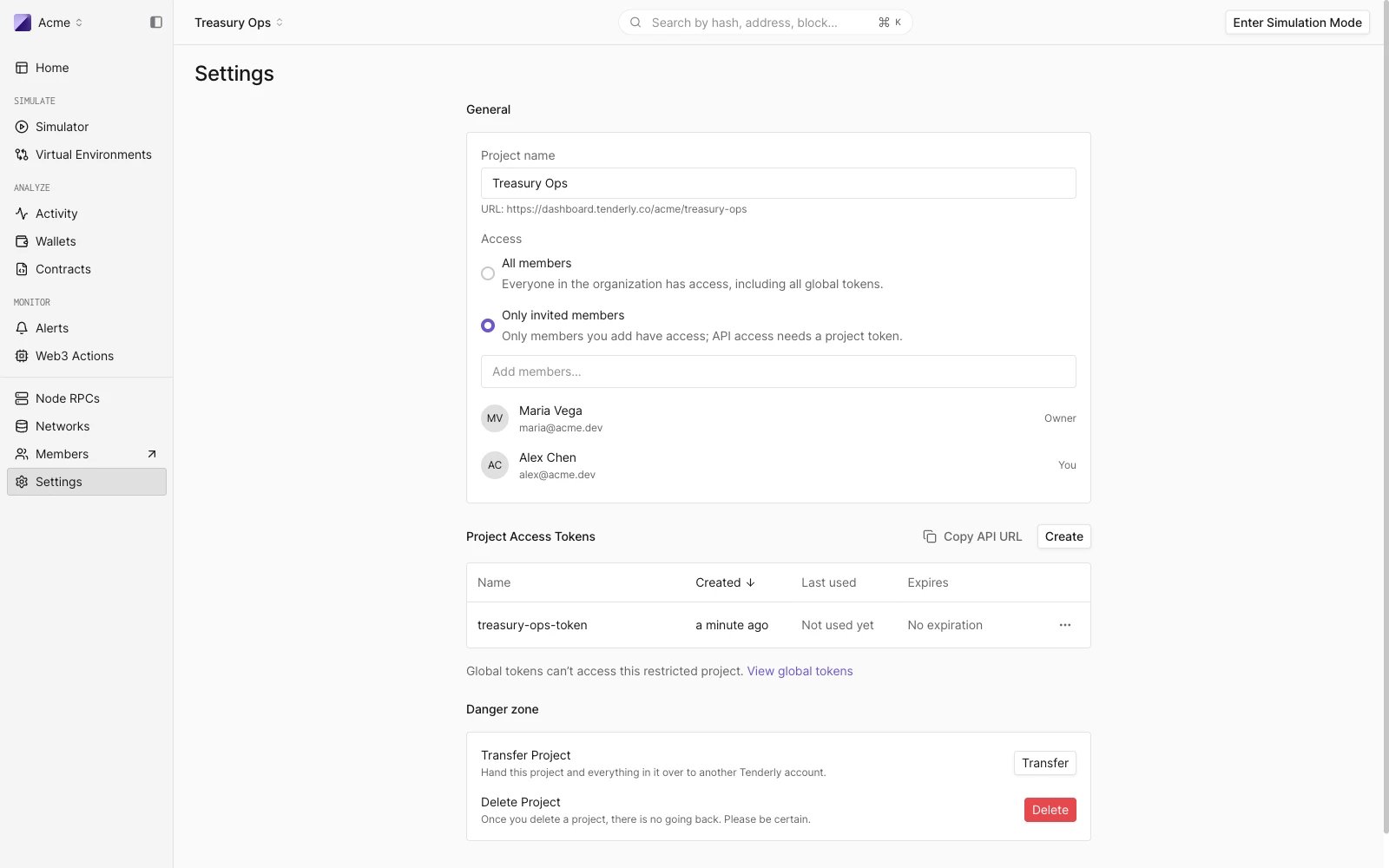
From the left-hand sidebar, go to **Settings** where you can:
* [Change the project name](/platform/account/projects/settings#change-project-name)
* [Manage project access and members](/platform/account/projects/settings#manage-project-access)
* [Create project access tokens](/platform/account/projects/settings#project-access-tokens)
* [Find account & project slugs](/platform/account/projects/slug)
* [Transfer project ownership](/platform/account/projects/settings#transfer-project-ownership)
* [Delete the project](/platform/account/projects/settings#delete-project)
 ## Change project name
The project name can be changed at any time in the **General** section. Changing the project name will not change the project slug.
**The project slug cannot be changed** after the project has been created.
When you update the project name, click **Update** to save the changes.
## Manage project access
The **Access** setting in the General section controls who can use the project:
* **All members**: everyone in the organization has access, including all global tokens.
* **Only invited members**: only members you add have access, and API access requires a project token.
Selecting **Only invited members** reveals the member list, where you add and remove project members. Changing access or members requires the **Update projects** [permission](/platform/account/organizations/members#member-permissions). For the full behavior, including the warnings about global tokens, see [Restrict project access](/platform/account/projects/restricted-projects).
## Project access tokens
The **Project Access Tokens** section lists the [access tokens](/platform/account/projects/api-tokens) scoped to this project, with their creation date, last use, and expiration. From here you can:
* **Copy API URL** for the project.
* Click **Create** to mint a new project token. The token's scope is fixed to this project; you choose a name and an optional expiration date. The token secret is displayed only once.
* Revoke a token from its row menu.
On a restricted project, the section notes that global tokens can't access the project. On a project open to the organization, global tokens also have access even though they are not listed here; manage them on the organization's [Access Tokens page](/platform/account/projects/api-tokens#manage-access-tokens).
## Transfer project ownership
Under **Danger zone**, click **Transfer** to hand the project and everything in it over to another Tenderly account. Type in the username of the new owner. Tenderly will automatically find the username if it exists.
Transfer will succeed unless the recipient already has a project with the same slug. In this case contact our support team at [support@tenderly.co](mailto:support@tenderly.co) for help transferring your project.
Toggle **Transfer Deliver Channels** ON if you also want to transfer all [Alert Destinations](/monitoring/alerts/destinations/overview) you've created within the project.
Click **Transfer** to complete the process.
## Delete project
Under **Danger zone**, click **Delete** to permanently remove the project from your account along with all the data associated with it.
The confirmation dialog states how many project tokens will be revoked. They stop working immediately but stay listed in the organization's token inventory. Global tokens are unaffected.
## Change project name
The project name can be changed at any time in the **General** section. Changing the project name will not change the project slug.
**The project slug cannot be changed** after the project has been created.
When you update the project name, click **Update** to save the changes.
## Manage project access
The **Access** setting in the General section controls who can use the project:
* **All members**: everyone in the organization has access, including all global tokens.
* **Only invited members**: only members you add have access, and API access requires a project token.
Selecting **Only invited members** reveals the member list, where you add and remove project members. Changing access or members requires the **Update projects** [permission](/platform/account/organizations/members#member-permissions). For the full behavior, including the warnings about global tokens, see [Restrict project access](/platform/account/projects/restricted-projects).
## Project access tokens
The **Project Access Tokens** section lists the [access tokens](/platform/account/projects/api-tokens) scoped to this project, with their creation date, last use, and expiration. From here you can:
* **Copy API URL** for the project.
* Click **Create** to mint a new project token. The token's scope is fixed to this project; you choose a name and an optional expiration date. The token secret is displayed only once.
* Revoke a token from its row menu.
On a restricted project, the section notes that global tokens can't access the project. On a project open to the organization, global tokens also have access even though they are not listed here; manage them on the organization's [Access Tokens page](/platform/account/projects/api-tokens#manage-access-tokens).
## Transfer project ownership
Under **Danger zone**, click **Transfer** to hand the project and everything in it over to another Tenderly account. Type in the username of the new owner. Tenderly will automatically find the username if it exists.
Transfer will succeed unless the recipient already has a project with the same slug. In this case contact our support team at [support@tenderly.co](mailto:support@tenderly.co) for help transferring your project.
Toggle **Transfer Deliver Channels** ON if you also want to transfer all [Alert Destinations](/monitoring/alerts/destinations/overview) you've created within the project.
Click **Transfer** to complete the process.
## Delete project
Under **Danger zone**, click **Delete** to permanently remove the project from your account along with all the data associated with it.
The confirmation dialog states how many project tokens will be revoked. They stop working immediately but stay listed in the organization's token inventory. Global tokens are unaffected.
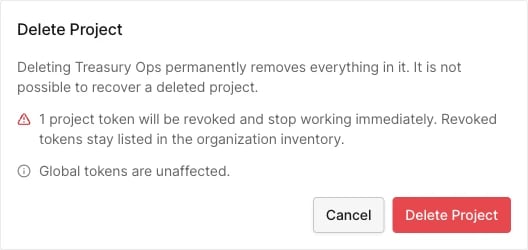 This action cannot be undone. It is not possible to recover a deleted project.
This documentation is built and hosted on [Mintlify](https://mintlify.com), a developer documentation platform.
This action cannot be undone. It is not possible to recover a deleted project.
This documentation is built and hosted on [Mintlify](https://mintlify.com), a developer documentation platform.