> ## Documentation Index
> Fetch the complete documentation index at: https://docs.tenderly.co/llms.txt
> Use this file to discover all available pages before exploring further.
# Create a Tenderly Project
> Create a Tenderly project to organize your work into separate spaces, switch between projects, set member access, and get a permanent project slug.
Projects help you organize your work into separate spaces.
When you first create a Tenderly account, you'll be prompted to create a project. To see all of your projects later, open the project switcher in the top breadcrumb, next to your organization name.
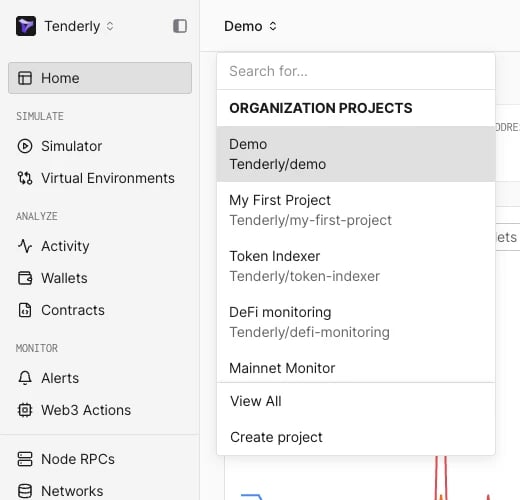 To create a new project, click **Create project** at the bottom of the switcher.
Give your project a unique name and click **Create Project**. The project URL preview updates as you type.
In an organization, the dialog also has an **Access** setting: keep the project open to **All members** (the default) or select **Only invited members** to [restrict it to an invited member list](/platform/account/projects/restricted-projects).
To create a new project, click **Create project** at the bottom of the switcher.
Give your project a unique name and click **Create Project**. The project URL preview updates as you type.
In an organization, the dialog also has an **Access** setting: keep the project open to **All members** (the default) or select **Only invited members** to [restrict it to an invited member list](/platform/account/projects/restricted-projects).
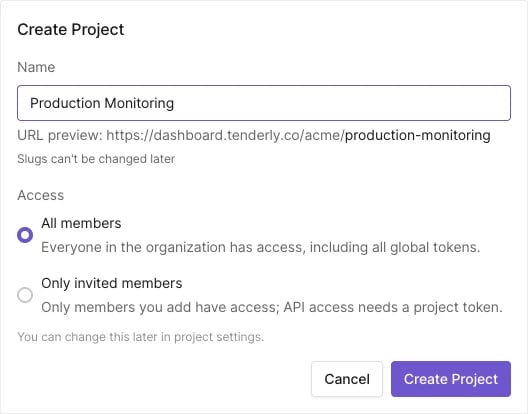 Once the project is created, you cannot change the [project slug](/platform/account/projects/slug).
If you're part of an [**Organization**](/platform/account/organizations/overview), the switcher shows the organization's projects you have access to: every project that is open to all members, plus the [restricted projects](/platform/account/projects/restricted-projects) you've been invited to.
## Manage projects with the API
The [Tenderly API](/api-reference) exposes the same operations for scripted setups. Authenticate with an [access token](/platform/account/projects/api-tokens); the create, delete and list endpoints take the account slug, the rest take the project slug or ID.
* [List projects](/api-reference/projects/list-projects)
* [Create a project](/api-reference/projects/create-a-project)
* [Get a project](/api-reference/projects/get-a-project)
* [Update a project](/api-reference/projects/update-a-project) (rename, options, access setting)
* [Delete a project](/api-reference/projects/delete-a-project)
This documentation is built and hosted on [Mintlify](https://mintlify.com), a developer documentation platform.
Once the project is created, you cannot change the [project slug](/platform/account/projects/slug).
If you're part of an [**Organization**](/platform/account/organizations/overview), the switcher shows the organization's projects you have access to: every project that is open to all members, plus the [restricted projects](/platform/account/projects/restricted-projects) you've been invited to.
## Manage projects with the API
The [Tenderly API](/api-reference) exposes the same operations for scripted setups. Authenticate with an [access token](/platform/account/projects/api-tokens); the create, delete and list endpoints take the account slug, the rest take the project slug or ID.
* [List projects](/api-reference/projects/list-projects)
* [Create a project](/api-reference/projects/create-a-project)
* [Get a project](/api-reference/projects/get-a-project)
* [Update a project](/api-reference/projects/update-a-project) (rename, options, access setting)
* [Delete a project](/api-reference/projects/delete-a-project)
This documentation is built and hosted on [Mintlify](https://mintlify.com), a developer documentation platform.