> ## Documentation Index
> Fetch the complete documentation index at: https://docs.tenderly.co/llms.txt
> Use this file to discover all available pages before exploring further.
# Project-Scoped
> Create project-scoped Tenderly Alert Destinations, using Web3 Actions and Webhooks to receive alert event data within a specific Tenderly project.
Project-scoped Destinations are only accessible within the project they were created.
### Web3 Actions
This type of alert destination means your action will be used as a [**destination for the alert**](/monitoring/web3-actions/references/notifications).
```yaml title="example.yaml" showLineNumbers theme={"theme":{"light":"catppuccin-latte","dark":"catppuccin-mocha"}}
trigger:
type: alert
alert: {}
```
A single action can be used as a destination for multiple alerts.
For more information, [read more about this and Web3 Actions in general](/monitoring/web3-actions/introduction).
### Webhooks
This alert destination allows for execution of your webhook when an alert is triggered. Your webhook will receive a signed payload, containing the transaction object that triggered the alert.
After adding a Webhook as an alert destination, you can use it as destination for other alerts.
#### The webhook requirements:
* It **must** be reachable at the webhook URL: when you add the webhook, Tenderly sends a **GET** request to verify reachability. Any HTTP response passes verification; verification fails only on transport errors (DNS, TCP, TLS, or no response within 2 seconds).
* It **must** expose a **POST** method with the same webhook URI. The webhook will receive a payload described below.
* Deliveries are considered failed unless the webhook responds with a `2xx` status within **10 seconds**.
* Using HTTPS for the webhook URL is strongly recommended.
The Webhook must respond with a `2xx` status within **10 seconds**. If there's no response in that
time-frame, the delivery is considered failed.
Tenderly keeps track of all executions. Webhook execution can have several statuses:
* **Success** - indicates that the webhook was successfully executed and the event was delivered to the specified URL
* **Failed** - indicates that the webhook was unable to be executed due to an error, such as a connectivity issue, a problem with the URL, or something else (check the response content to see what caused the error or contact our support)
* **Pending** - indicates that the webhook is in the process of being executed and has not yet been completed
* **Retry** - indicates that the webhook execution failed and will be retried; an event is delivered in at most **5 total attempts** before the status settles at Success or Failed
* **Skipped** - indicates that the webhook was not executed because it was disabled
#### Webhook payload
The webhook will receive the payload representing the alerting event. The payload consists of four fields:
* **id**: `String` - ID unique across all delivered alert events (UUID).
* **event\_type**: `TEST` | `ALERT` - the type of webhook event type.
* **alert\_id**: `String` - the ID of the alert whose rule triggered this event. Empty for `TEST` events.
* **transaction**: `Object` - an object representing an un-decoded transaction that triggered the alert and the webhook execution.
Upon adding the webhook as an alert destination, it will be invoked with a `TEST` alert event type.
Use the `id` field to ensure your webhook processes each alert event exactly once, by keeping
track of processed IDs.
#### Securing the Webhook
You can enhance security of your webhooks using the signature validation method. This way, you can verify that the request to webhook originates from Tenderly, before proceeding with the execution.
The `x-tenderly-signature` header contains a cryptographic signature: an HMAC-SHA256 digest computed with the signing secret as the **key**, over the request payload followed by the timestamp. The timestamp is delivered in the `Date` HTTP header of the request.
The Signing Secret is unique for each webhook destination. Tenderly generates this secret and uses
it to generate a signature for the payload. Keep it at a safe place.
**Step 1.** Obtain the Secret Signing Secret.
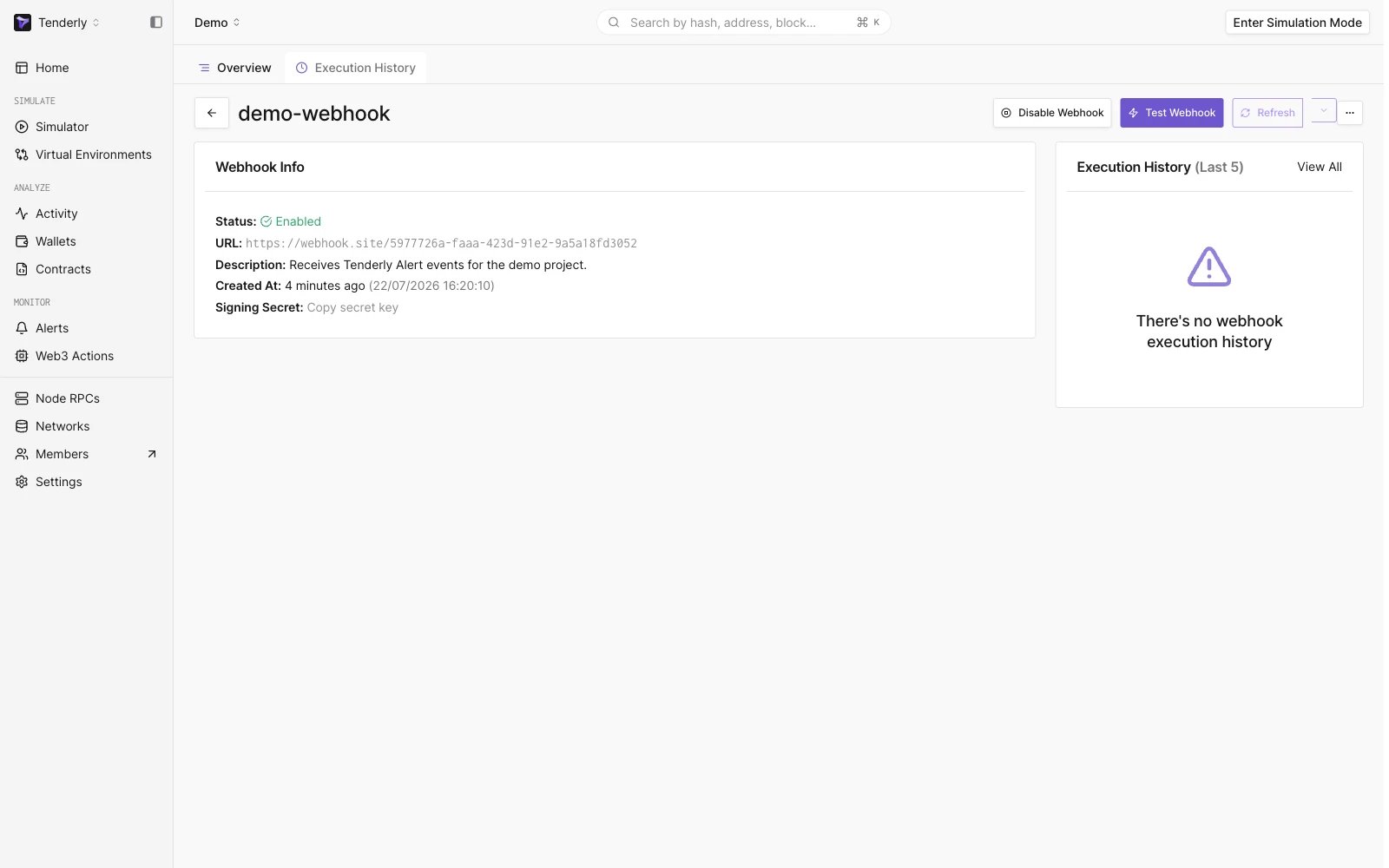 **Step 2.** Validate the received signature
To validate the received signature, compute an HMAC-SHA256 digest using the signing secret as the key, feeding it, in this order:
1. the entire webhook request payload,
2. the timestamp (from the `Date` header of the request).
Lastly, compare the hex-encoded digest with the value of the `x-tenderly-signature` header.
```go title="example.go" showLineNumbers theme={"theme":{"light":"catppuccin-latte","dark":"catppuccin-mocha"}}
func isValidSignature(
signature string,
payload []byte,
timestamp string,
) bool {
h := hmac.New(sha256.New, []byte(signingKey))
h.Write(payload)
h.Write([]byte(timestamp))
digest := hex.EncodeToString(h.Sum(nil))
return digest == signature
}
```
```javascript title="example.js" showLineNumbers showLineNumbers theme={"theme":{"light":"catppuccin-latte","dark":"catppuccin-mocha"}}
function isValidSignature(signature, payload, timestamp) {
// Create a HMAC SHA256 hash using the signing key
const hmac = crypto.createHmac("sha256", signingKey);
// Update the hash with the request body using utf8
hmac.update(payload.toString(), 'utf8');
// Update the hash with the request timestamp
hmac.update(timestamp);
const digest = hmac.digest("hex");
return crypto.timingSafeEqual(Buffer.from(signature), Buffer.from(digest))
}
```
```python title="example.py" showLineNumbers theme={"theme":{"light":"catppuccin-latte","dark":"catppuccin-mocha"}}
def isValidSignature(signature: string, payload: bytes, timestamp: string):
h = hmac.new(str.encode(signingKey), payload, hashlib.sha256)
h.update(str.encode(timestamp))
digest = h.hexdigest()
return hmac.compare_digest(signature, digest)
```
#### Debugging Webhook executions
To support debugging of webhook malfunctions, you can manually send `TEST` events, based on existing transactions from any network
**Step 1.** Click "**Test Webhook**" in the header of the webhook page.
**Step 2.** Validate the received signature
To validate the received signature, compute an HMAC-SHA256 digest using the signing secret as the key, feeding it, in this order:
1. the entire webhook request payload,
2. the timestamp (from the `Date` header of the request).
Lastly, compare the hex-encoded digest with the value of the `x-tenderly-signature` header.
```go title="example.go" showLineNumbers theme={"theme":{"light":"catppuccin-latte","dark":"catppuccin-mocha"}}
func isValidSignature(
signature string,
payload []byte,
timestamp string,
) bool {
h := hmac.New(sha256.New, []byte(signingKey))
h.Write(payload)
h.Write([]byte(timestamp))
digest := hex.EncodeToString(h.Sum(nil))
return digest == signature
}
```
```javascript title="example.js" showLineNumbers showLineNumbers theme={"theme":{"light":"catppuccin-latte","dark":"catppuccin-mocha"}}
function isValidSignature(signature, payload, timestamp) {
// Create a HMAC SHA256 hash using the signing key
const hmac = crypto.createHmac("sha256", signingKey);
// Update the hash with the request body using utf8
hmac.update(payload.toString(), 'utf8');
// Update the hash with the request timestamp
hmac.update(timestamp);
const digest = hmac.digest("hex");
return crypto.timingSafeEqual(Buffer.from(signature), Buffer.from(digest))
}
```
```python title="example.py" showLineNumbers theme={"theme":{"light":"catppuccin-latte","dark":"catppuccin-mocha"}}
def isValidSignature(signature: string, payload: bytes, timestamp: string):
h = hmac.new(str.encode(signingKey), payload, hashlib.sha256)
h.update(str.encode(timestamp))
digest = h.hexdigest()
return hmac.compare_digest(signature, digest)
```
#### Debugging Webhook executions
To support debugging of webhook malfunctions, you can manually send `TEST` events, based on existing transactions from any network
**Step 1.** Click "**Test Webhook**" in the header of the webhook page.
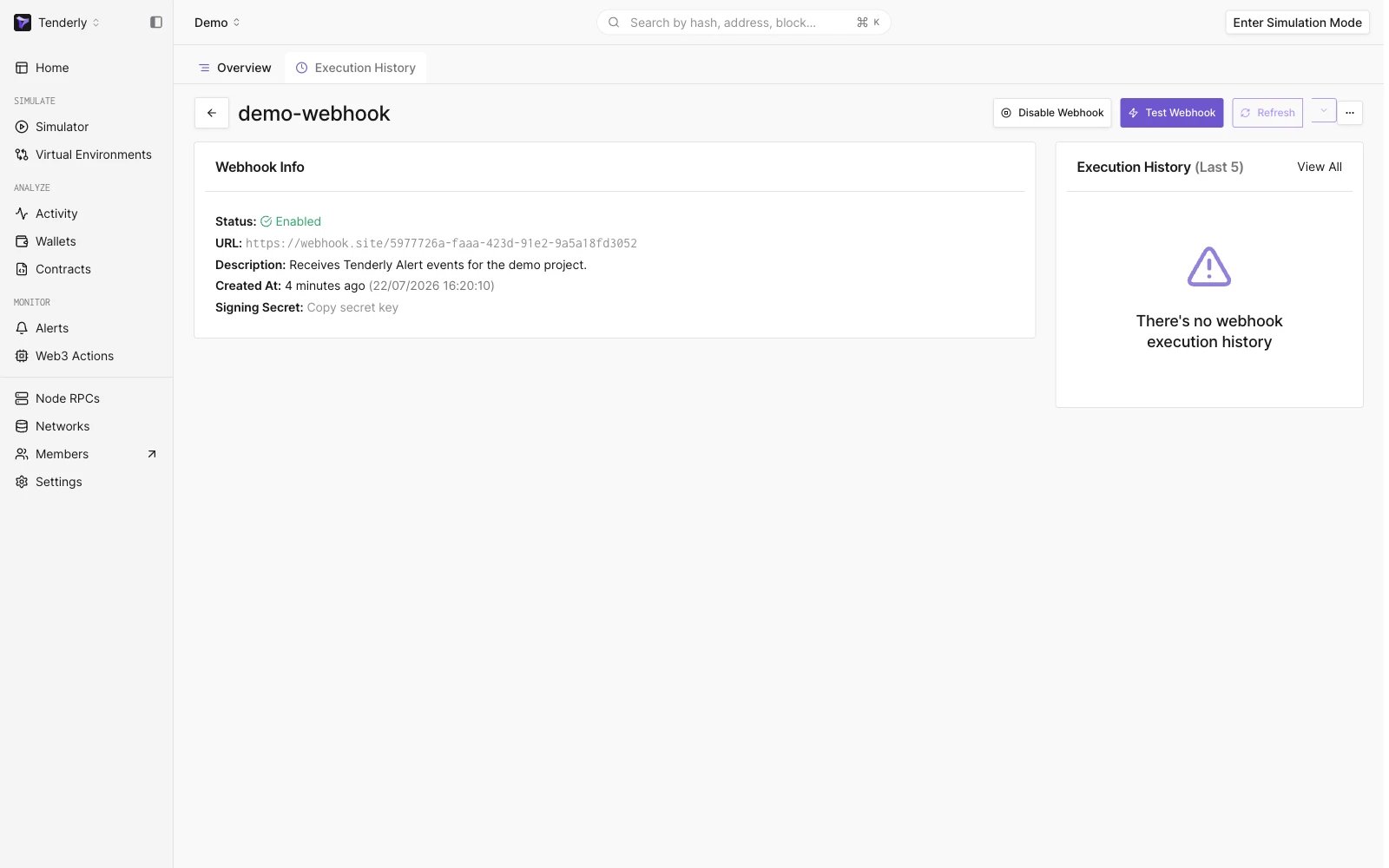 **Step 2.** Paste a hash of a transaction that matches your alert's trigger
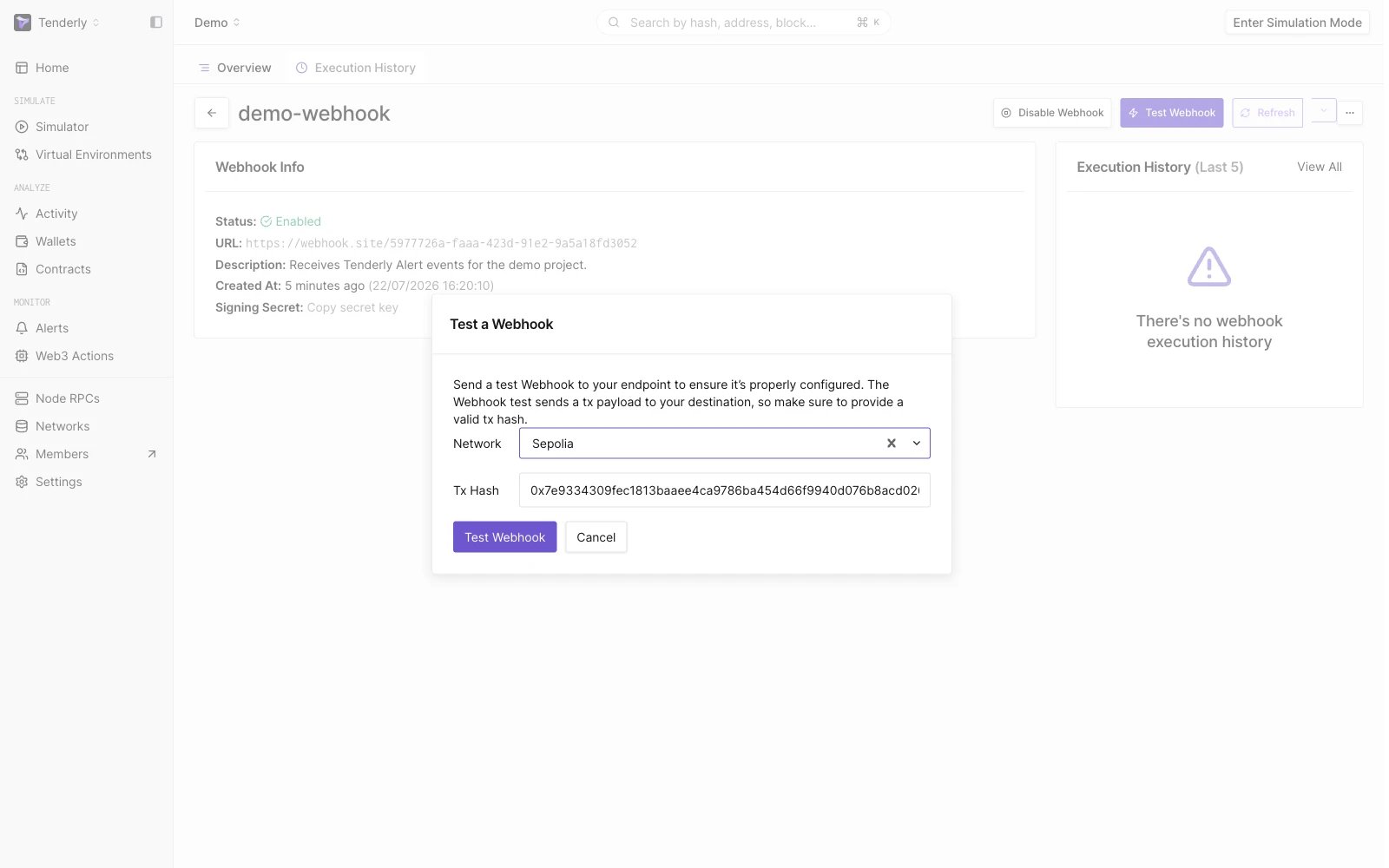 **Step 3.** Click "**Test Webhook**" to confirm and send the test event.
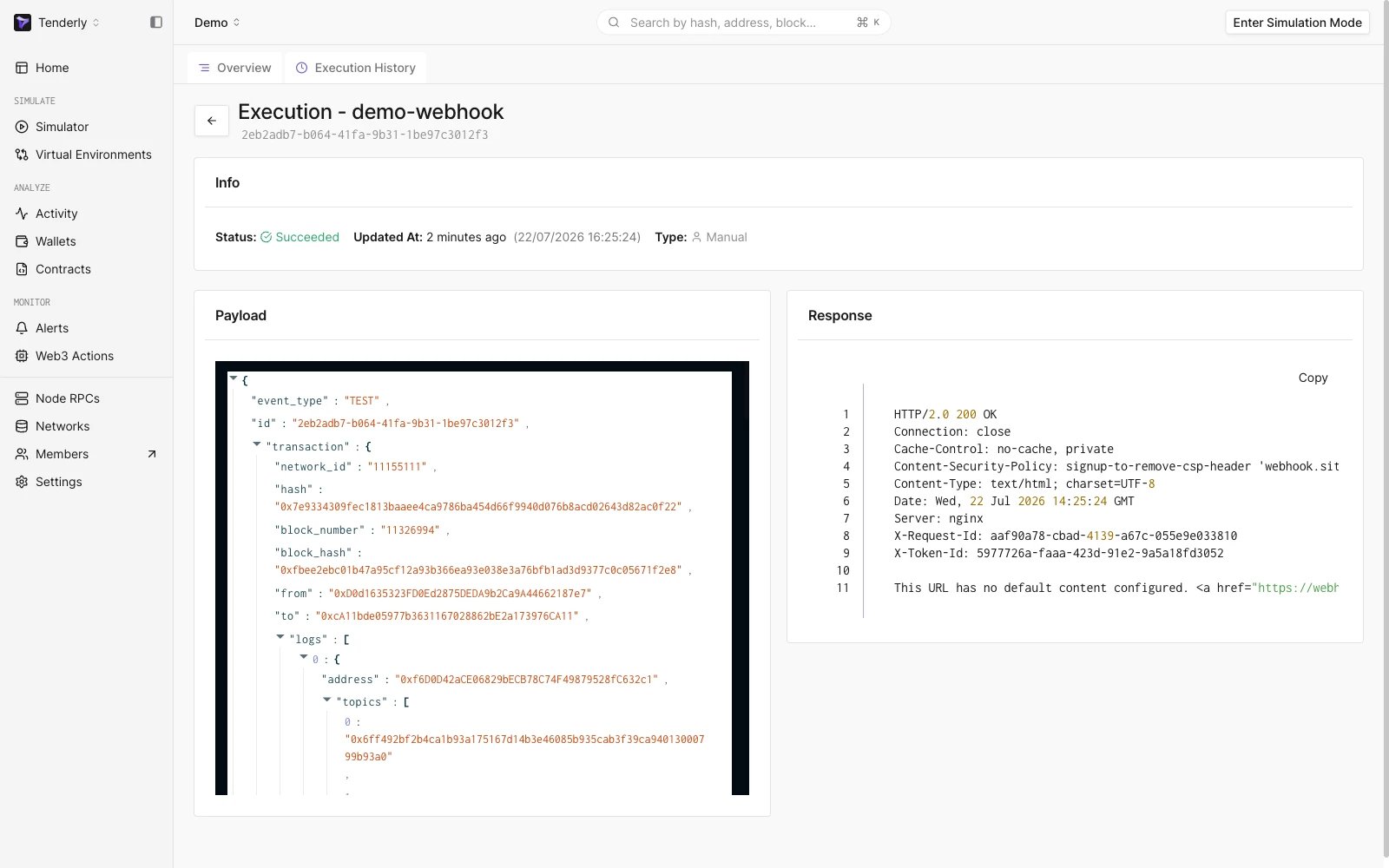
Your webhook will be invoked with the transaction corresponding to the hash you pasted, and **event\_type** of `TEST`. You'll be presented with overview of that execution.
**Step 3.** Click "**Test Webhook**" to confirm and send the test event.
Your webhook will be invoked with the transaction corresponding to the hash you pasted, and **event\_type** of `TEST`. You'll be presented with overview of that execution.
 This documentation is built and hosted on [Mintlify](https://mintlify.com), a developer documentation platform.